
🌍 Global Mirror — Visit original CN site →
Skip to main content

Introduction

LangDB AI Gateway provides OpenAI-compatible APIs to connect with multiple Large Language Models and serves as an observability platform that makes it effortless to trace CrewAI workflows end-to-end while providing access to 350+ language models. With a single init() call, all agent interactions, task executions, and LLM calls are captured, providing comprehensive observability and production-ready AI infrastructure for your applications.
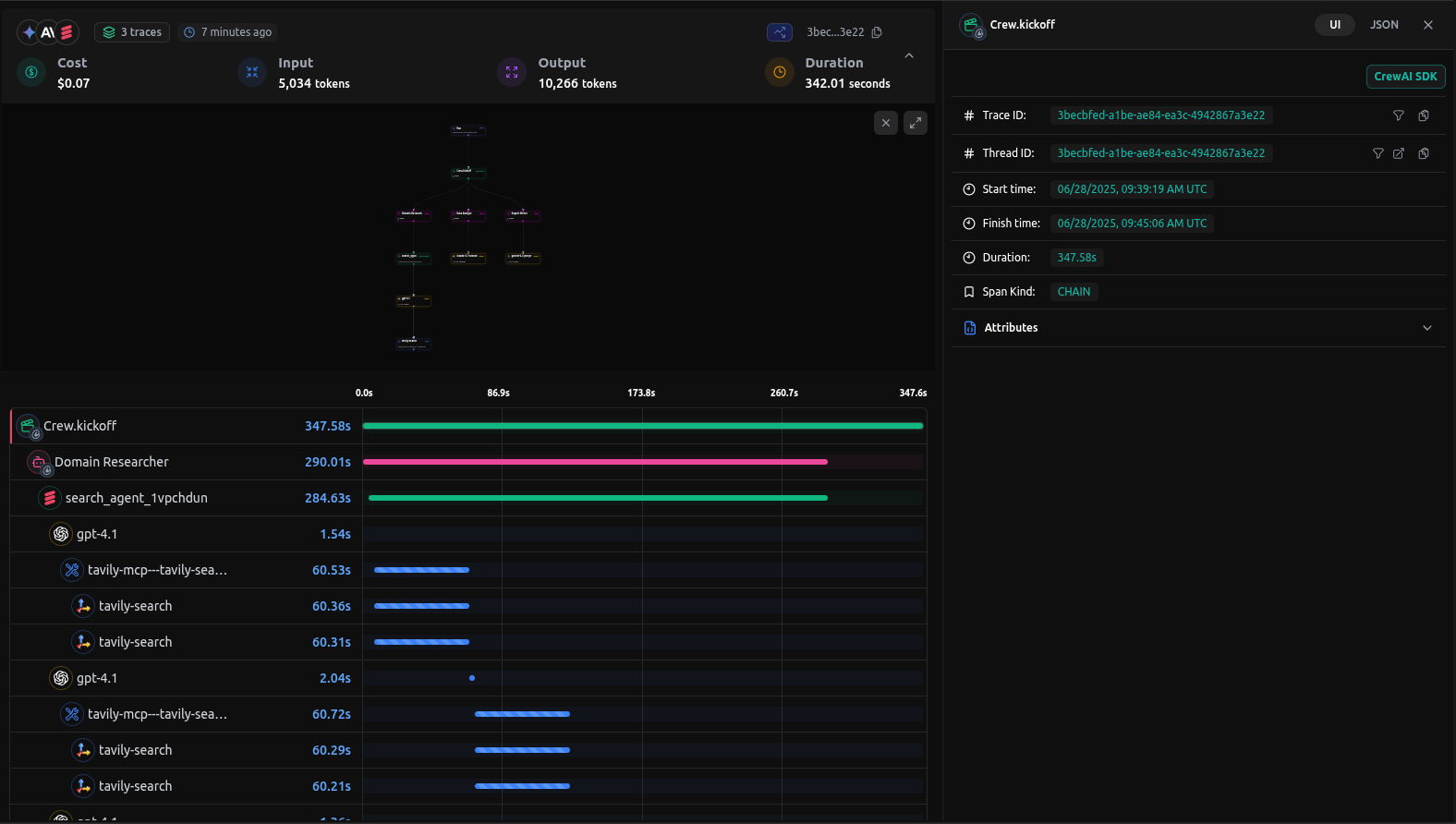
LangDB CrewAI trace example

LangDB CrewAI Trace Example

Checkout: View the live trace example

Features

AI Gateway Capabilities

  • Access to 350+ LLMs: Connect to all major language models through a single integration
  • Virtual Models: Create custom model configurations with specific parameters and routing rules
  • Virtual MCP: Enable compatibility and integration with MCP (Model Context Protocol) systems for enhanced agent communication
  • Guardrails: Implement safety measures and compliance controls for agent behavior

Observability & Tracing

  • Automatic Tracing: Single init() call captures all CrewAI interactions
  • End-to-End Visibility: Monitor agent workflows from start to finish
  • Tool Usage Tracking: Track which tools agents use and their outcomes
  • Model Call Monitoring: Detailed insights into LLM interactions
  • Performance Analytics: Monitor latency, token usage, and costs
  • Debugging Support: Step-through execution for troubleshooting
  • Real-time Monitoring: Live traces and metrics dashboard

Setup Instructions

1

Install LangDB

Install the LangDB client with CrewAI feature flag:
pip install 'pylangdb[crewai]'
2

Set Environment Variables

Configure your LangDB credentials:
export LANGDB_API_KEY="<your_langdb_api_key>"
export LANGDB_PROJECT_ID="<your_langdb_project_id>"
export LANGDB_API_BASE_URL='https://api.us-east-1.langdb.ai'
3

Initialize Tracing

Import and initialize LangDB before configuring your CrewAI code:
from pylangdb.crewai import init
# Initialize LangDB
init()
4

Configure CrewAI with LangDB

Set up your LLM with LangDB headers:
from crewai import Agent, Task, Crew, LLM
import os

# Configure LLM with LangDB headers
llm = LLM(
    model="openai/gpt-4o", # Replace with the model you want to use
    api_key=os.getenv("LANGDB_API_KEY"),
    base_url=os.getenv("LANGDB_API_BASE_URL"),
    extra_headers={"x-project-id": os.getenv("LANGDB_PROJECT_ID")}
)

Quick Start Example

Here’s a simple example to get you started with LangDB and CrewAI:
import os
from pylangdb.crewai import init
from crewai import Agent, Task, Crew, LLM

# Initialize LangDB before any CrewAI imports
init()

def create_llm(model):
    return LLM(
        model=model,
        api_key=os.environ.get("LANGDB_API_KEY"),
        base_url=os.environ.get("LANGDB_API_BASE_URL"),
        extra_headers={"x-project-id": os.environ.get("LANGDB_PROJECT_ID")}
    )

# Define your agent
researcher = Agent(
    role="Research Specialist",
    goal="Research topics thoroughly",
    backstory="Expert researcher with skills in finding information",
    llm=create_llm("openai/gpt-4o"), # Replace with the model you want to use
    verbose=True
)

# Create a task
task = Task(
    description="Research the given topic and provide a comprehensive summary",
    agent=researcher,
    expected_output="Detailed research summary with key findings"
)

# Create and run the crew
crew = Crew(agents=[researcher], tasks=[task])
result = crew.kickoff()
print(result)

Complete Example: Research and Planning Agent

This comprehensive example demonstrates a multi-agent workflow with research and planning capabilities.

Prerequisites

pip install crewai 'pylangdb[crewai]' crewai_tools setuptools python-dotenv

Environment Setup

# LangDB credentials
export LANGDB_API_KEY="<your_langdb_api_key>"
export LANGDB_PROJECT_ID="<your_langdb_project_id>"
export LANGDB_API_BASE_URL='https://api.us-east-1.langdb.ai'

# Additional API keys (optional)
export SERPER_API_KEY="<your_serper_api_key>"  # For web search capabilities

Complete Implementation

#!/usr/bin/env python3

import os
import sys
from pylangdb.crewai import init
init()  # Initialize LangDB before any CrewAI imports
from dotenv import load_dotenv
from crewai import Agent, Task, Crew, Process, LLM
from crewai_tools import SerperDevTool

load_dotenv()

def create_llm(model):
    return LLM(
        model=model,
        api_key=os.environ.get("LANGDB_API_KEY"),
        base_url=os.environ.get("LANGDB_API_BASE_URL"),
        extra_headers={"x-project-id": os.environ.get("LANGDB_PROJECT_ID")}
    )

class ResearchPlanningCrew:
    def researcher(self) -> Agent:
        return Agent(
            role="Research Specialist",
            goal="Research topics thoroughly and compile comprehensive information",
            backstory="Expert researcher with skills in finding and analyzing information from various sources",
            tools=[SerperDevTool()],
            llm=create_llm("openai/gpt-4o"),
            verbose=True
        )
    
    def planner(self) -> Agent:
        return Agent(
            role="Strategic Planner",
            goal="Create actionable plans based on research findings",
            backstory="Strategic planner who breaks down complex challenges into executable plans",
            reasoning=True,
            max_reasoning_attempts=3,
            llm=create_llm("openai/anthropic/claude-3.7-sonnet"),
            verbose=True
        )
    
    def research_task(self) -> Task:
        return Task(
            description="Research the topic thoroughly and compile comprehensive information",
            agent=self.researcher(),
            expected_output="Comprehensive research report with key findings and insights"
        )
    
    def planning_task(self) -> Task:
        return Task(
            description="Create a strategic plan based on the research findings",
            agent=self.planner(),
            expected_output="Strategic execution plan with phases, goals, and actionable steps",
            context=[self.research_task()]
        )
    
    def crew(self) -> Crew:
        return Crew(
            agents=[self.researcher(), self.planner()],
            tasks=[self.research_task(), self.planning_task()],
            verbose=True,
            process=Process.sequential
        )

def main():
        topic = sys.argv[1] if len(sys.argv) > 1 else "Artificial Intelligence in Healthcare"
        
        crew_instance = ResearchPlanningCrew()
        
        # Update task descriptions with the specific topic
        crew_instance.research_task().description = f"Research {topic} thoroughly and compile comprehensive information"
    crew_instance.planning_task().description = f"Create a strategic plan for {topic} based on the research findings"
    
    result = crew_instance.crew().kickoff()
    print(result)

if __name__ == "__main__":
    main()

Running the Example

python main.py "Sustainable Energy Solutions"

Viewing Traces in LangDB

After running your CrewAI application, you can view detailed traces in the LangDB dashboard:
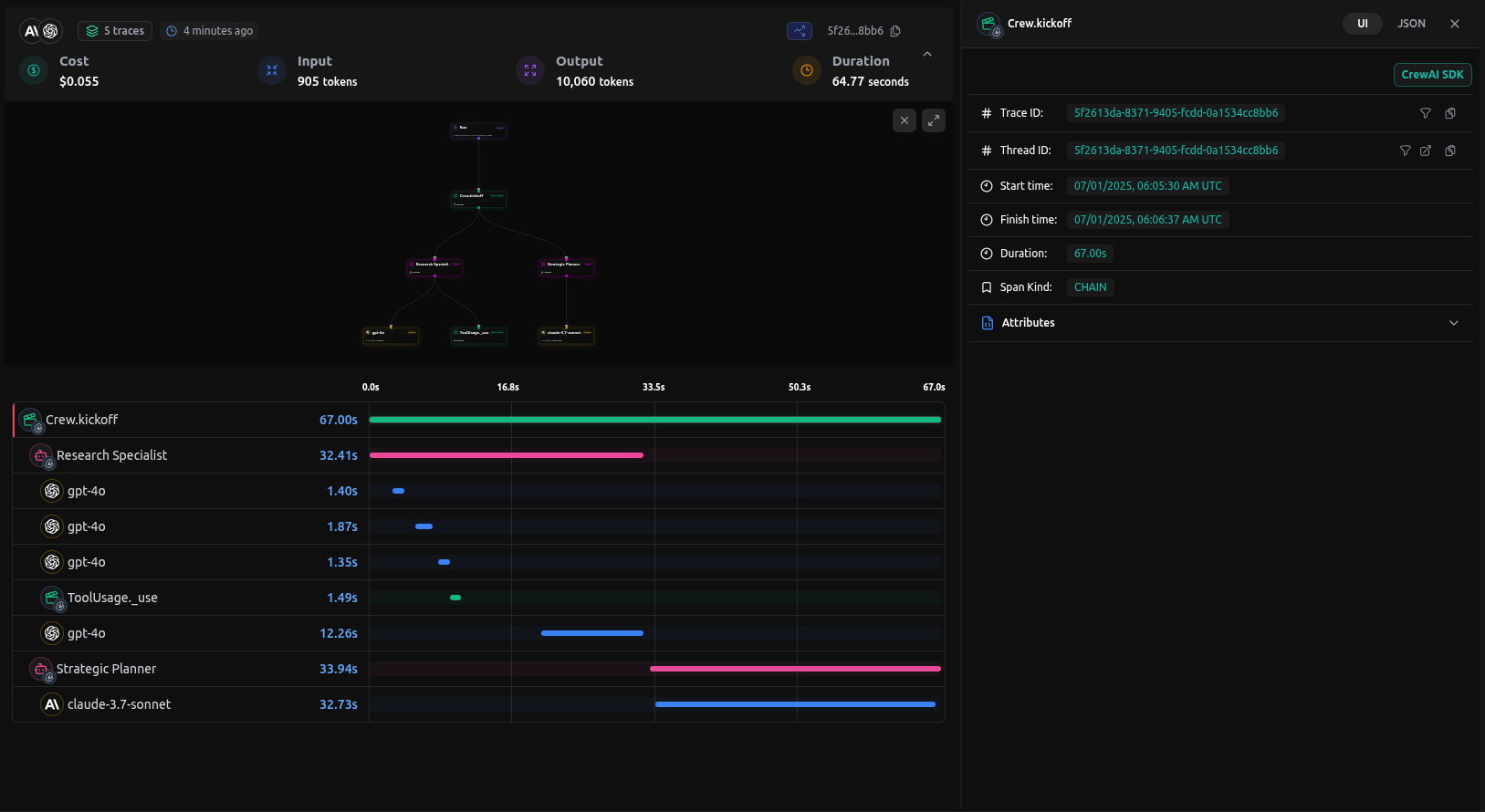
LangDB trace dashboard showing CrewAI workflow

LangDB Trace Dashboard

What You’ll See

  • Agent Interactions: Complete flow of agent conversations and task handoffs
  • Tool Usage: Which tools were called, their inputs, and outputs
  • Model Calls: Detailed LLM interactions with prompts image.pngand responses
  • Performance Metrics: Latency, token usage, and cost tracking
  • Execution Timeline: Step-by-step view of the entire workflow

Troubleshooting

Common Issues

  • No traces appearing: Ensure init() is called before any CrewAI imports
  • Authentication errors: Verify your LangDB API key and project ID

Resources

Next Steps

This guide covered the basics of integrating LangDB AI Gateway with CrewAI. To further enhance your AI workflows, explore:
  • Virtual Models: Create custom model configurations with routing strategies
  • Guardrails & Safety: Implement content filtering and compliance controls
  • Production Deployment: Configure fallbacks, retries, and load balancing
For more advanced features and use cases, visit the LangDB Documentation or explore the Model Catalog to discover all available models.
LangDB CrewAI trace example
LangDB trace dashboard showing CrewAI workflow